How to Send a Test Fax and Confirm It Arrived
Before you trust an online fax service — or a fax machine that has sat idle for months — with a document that matters, run a test. A good test uses a throwaway document, a destination you control or trust, and one habit that separates a real confirmation from a guess: reading the provider’s transmission result instead of your email’s Sent folder. MyFax’s testing guidance recommends re-testing at life events, not just once — it calls testing something you do “periodically,” especially after setting up a new device or changing phone lines or service providers.
Quick answer: make a one-page, non-sensitive test sheet, send it to a fax number you control (or a willing recipient who will confirm), and then check the provider’s transmission status — delivered means your provider reports the transmission completed, while your email saying “Sent” only means your message left the mailbox. If the test fails, change one variable at a time.
Step 1: Make a Safe Test Document
Use a document you would be perfectly happy to see land on a stranger’s machine — because a typo in the fax number can put it there. A good test sheet is one page and contains:
- a large heading such as TEST FAX so nobody mistakes it for a real document,
- the date and time you sent it,
- your name or company and a reply contact,
- a page marker like “Page 1 of 1” so the receiving side can confirm nothing is missing.
Keep everything else off it: no protected health information, no financial or account numbers, no signatures, no letterhead you would not want copied. A plain PDF is the dependable format choice, for the same reasons as in our guide to sending faxes online.
Step 2: Pick Your Test Method (Safest First)
- Send to a second number you control. A fax machine at your office, a number on another service, or a line at a second location gives you both ends of the test — you see the send result and the received pages.
- Send to your own online fax number. The provider documentation we track doesn’t establish whether a fax addressed to your own inbound number gets delivered back to you, so treat this as a convenience test only: if it works, you have a full loop — if it fails, that alone proves nothing, and you should re-test against a second number before concluding anything is broken.
- Ask a willing recipient. A colleague or business contact who agrees to check their machine closes the loop — MyFax’s testing guidance suggests exactly this pattern: fax them a document and have them send a return fax so you verify receiving too.
- A vendor-documented test service. HP currently documents a U.S.-only HP Fax Test Service for checking HP printer and fax-machine setup: per HP’s support pages, you send a one-page black-and-white test page with a fax header matching your 10-digit number, and the service faxes a reply back within about 5–7 minutes. It’s aimed at fax hardware setup rather than online-fax accounts, we haven’t tested it ourselves, and the dial-in details live on HP’s official page — which is also why we don’t reprint test numbers here: an out-of-date line can reach a number that now belongs to someone else entirely, or simply a dead end. If a vendor you already use documents its own test line in your manual or account, that documented number is the one worth using.
Step 3: Confirm It Actually Arrived
The status that matters lives in your fax provider’s dashboard or confirmation email — not your email client.
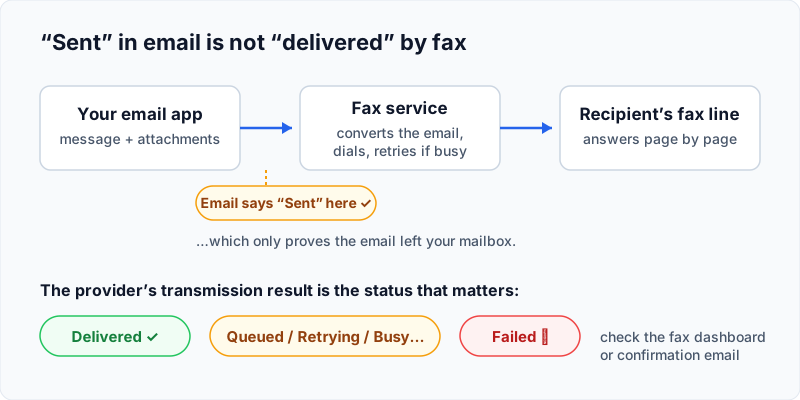
Providers document this result in different places: Fax.Plus emails a delivery confirmation, SRFax sends a confirmation email for every fax, MyFax offers optional confirmations that include the destination, time, and page count, and portal-based services like Nextiva vFAX show per-fax success or failure in the dashboard. Whatever the surface, look for two things: a delivered/success status and the page count matching what you sent.
Then check the receiving side. “Delivered” means your provider reports the transmission completed — it does not prove the pages are readable. Confirm the received copy has every page, right side up, legible, and showing the header or caller ID you expect.
Reading the Status Vocabulary
Exact status names and behavior vary by provider — read them as your service’s reported outcome, not a universal standard:
- Delivered / success — your provider reports the transmission completed. Your test passed; check legibility.
- Queued / processing — the provider hasn’t dialed yet, or is mid-transmission. Wait; this is not a failure.
- Retrying / busy / no answer — the destination didn’t answer. Retry behavior is provider-specific — Fax.Plus, for example, documents a configurable Auto-Retry on Failure option — so check how your service handles it, and do not resend while a retry may still be running, or you’ll produce duplicates the moment the line frees up.
- Failed — your provider reports the fax did not go through. Now troubleshoot.
When the Test Fails
Change one variable at a time, and start with the boring causes:
- Re-check the number and format. Wrong or incompletely formatted destinations are the classic failure — the rules differ by provider and country, covered in our email-to-fax guide.
- Confirm the destination can receive. The number may not be active yet, or the receiving plan may not include receiving at all — the eligibility rules per provider are in our guide to receiving faxes online.
- A self-fax that failed proves nothing by itself — re-run the test against a second number before blaming your service (see method 2 above).
- Still stuck? Contact your provider’s support with the fax number, the time of the attempt, and the status or reference ID shown — and if the service itself is the problem, our comparison is the place to weigh alternatives.
Test-Fax FAQ
Can I fax a test to my own number?
The provider documentation we track doesn’t establish whether a self-addressed fax comes back to you — so use it as a quick check if it happens to work, never as proof of failure.
Is there a free public test fax number?
We don’t reprint numbers here. HP documents a U.S.-only test service for its fax hardware (linked in the sources below); beyond that, unverified numbers go stale and can reach lines that now belong to someone else. Use a number you control or a documented vendor line from your own equipment’s manual or account.
Does “delivered” mean the fax printed correctly?
No. Delivered means your provider reports the transmission completed. Page count, orientation, and legibility can only be confirmed by whoever can see the received copy.
How often should I re-test?
Tie it to events rather than a calendar: a new machine or service, a ported number, changed phone lines, or a long idle stretch — the situations MyFax’s own testing guidance calls out.
Official Sources
The provider documentation behind this guide, as ordinary direct links:
- HP — Fax Test Service (U.S.-only, HP fax hardware)
- MyFax — steps to send a test fax
- MyFax — how to test a fax machine
- MyFax — user guide (PDF, confirmation details)
- Fax.Plus — email to fax (delivery confirmation)
- Fax.Plus — Auto-Retry on Failure option
- Nextiva — vFAX Quick Start Guide (PDF, status views)
- SRFax — sending faxes FAQ (confirmation email)